
























TrendKia
AllLiveNational
World
All World
PakistanChinaAmericaEuropeAsia
Politics
Uttar Pradesh
Uttar Pradesh
Uttar PradeshBiharMadhya PradeshRajasthanDelhiMaharashtraGujaratPunjabHaryanaWest BengalTamil NaduKeralaKarnatakaTelanganaAndhra PradeshJharkhandChhattisgarhOdishaAssamUttarakhandHimachal PradeshJammu & KashmirGoaChandigarhPuducherry
Travel
Travel
Business
MarketMoneyAutoBenefitsSuccess StoriesCryptoAI
Sports
CricketTennisFootball
EntertainmentMovies, TV & celebrities
BollywoodOTTBhojpuriMovie ReviewsTVHollywood
TechnologyGadgets, apps & innovation
AccessoriesLaunch & ReviewDIY
HealthHealth, fitness & wellness
LifestyleFashion, relationships & lifestyle
Fashion & BeautyCultureRelationshipsTrendsParenting
FoodRecipes, food & restaurants
ReligionFaith, belief & spirituality
FestivalsVastuSpirituality
Astrology
AriesTaurusGeminiCancerLeoVirgoLibraScorpioSagittariusCapricornAquariusPisces
TravelDestinations & travel guides
Travel Tips
EducationJobs, exams & results
VacanciesAdmissionExamResultsCareer
Live
National
World
Pakistan China America Europe Asia
Politics
Business
Market Money Auto Benefits Success Stories Crypto AI
Sports
Cricket Tennis Football
Entertainment
Bollywood OTT Bhojpuri Movie Reviews TV Hollywood
Technology
Accessories Launch & Review DIY
Health
Lifestyle
Fashion & Beauty Culture Relationships Trends Parenting
Food
Religion
Festivals Vastu Spirituality
Astrology
Aries Taurus Gemini Cancer Leo Virgo Libra Scorpio Sagittarius Capricorn Aquarius Pisces
Travel
Travel Tips
Education
Vacancies Admission Exam Results Career
Uttar Pradesh Bihar Madhya Pradesh Rajasthan Delhi Maharashtra Gujarat Punjab Haryana West Bengal Tamil Nadu Kerala Karnataka Telangana Andhra Pradesh Jharkhand Chhattisgarh Odisha Assam Uttarakhand Himachal Pradesh Jammu & Kashmir Goa Chandigarh Puducherry
About Contact Privacy Cookies Terms Advertise
TrendKia logo Hindi • English News Platform

TrendKia

Fast • Fresh • Always Trending

TrendKia is a free bilingual Hindi–English news platform — trending stories from India and around the world. Sign in with Google to comment and follow topics.

About Us
TrendKia news app preview
TrendKia
AboutContactPrivacyCookiesTermsAdvertise
Opera Adds a Built-In Shield to Stop ClickFix-Style Hacking AttemptsTechnology
1 hour ago· 3

Opera Adds a Built-In Shield to Stop ClickFix-Style Hacking Attempts

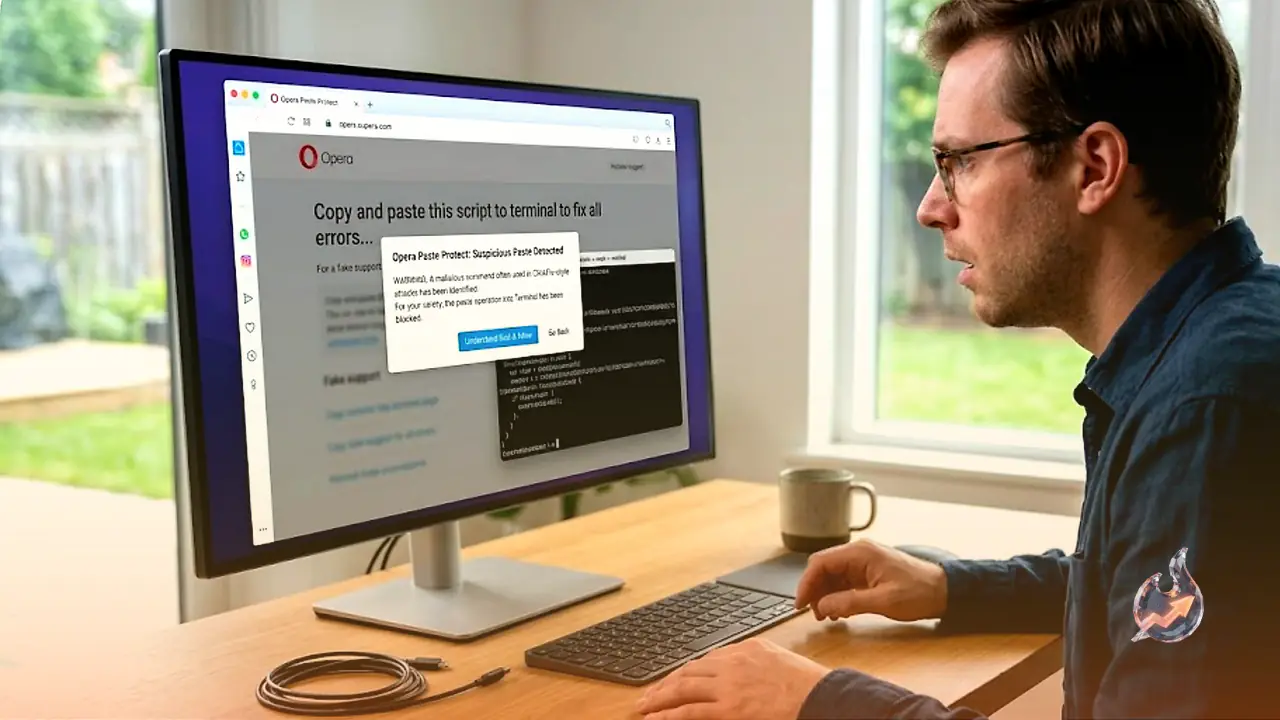
Opera has added a new feature called Paste Protect that warns users before they run malicious commands often used in ClickFix-style attacks, building on the browser's existing Hijack Protection safeguard.

Rohan GuptaRohan GuptaTechnology Correspondent 3 min read For AI
Share

A new security feature in the Opera browser aims to stop one of the most deceptive hacking techniques making the rounds this year, an attack known as ClickFix. Earlier this year, security firm Huntress discovered a malicious browser extension designed to carry out ClickFix attacks, a scheme sophisticated enough to hand attackers full control of a victim's computer. Until now, avoiding this trap depended almost entirely on users being cautious enough not to install suspicious extensions in the first place. Opera has now built a defense against this technique directly into its browser, rather than leaving users to fend for themselves.

What exactly is a ClickFix attack

In a ClickFix scheme, attackers first trick a user into installing a malicious browser extension. Once installed, the extension displays a fake error prompt inside the browser. This pop-up claims to offer a fix, but the solution actually requires the victim to copy a malicious command and paste it into their device's command prompt to run it. Some versions of the attack are even more devious. They show a fake captcha verification that is designed to fail, then offer the malicious code as the only way to pass it.

How Paste Protect steps in

Opera's answer is a new feature called Paste Protect, built specifically to block code injection attacks such as ClickFix. When Paste Protect detects that a user may be the target of such an attack, it throws up a warning pop-up telling them not to copy the malicious command, along with a button to simply close the tab and walk away from the threat. For anyone curious about what exactly triggered the warning, there is a Show content option that reveals the first 120 characters of the flagged command. Opera says Paste Protect relies on platform-specific detection methods tailored separately for Linux, macOS, and Windows, allowing it to recognize patterns commonly associated with malicious scripts across each operating system.

There's still a way to override it

Paste Protect is not designed to lock users out entirely. If someone is confident the warning is a false positive, a red button labeled Hold to copy (unsafe) lets them proceed anyway, but only after holding it down for more than five seconds, a deliberate friction meant to stop accidental or hasty clicks. Opera also lets users mark a trusted site as always allowed, so the feature will not keep flagging legitimate code from sites they use regularly. The overall approach mirrors how Apple and Microsoft handle unverified app installations, where a warning appears first, and only a user who understands the risk and insists on proceeding can bypass it.

Opera's second line of clipboard defense

Paste Protect is not the company's first attempt at guarding user clipboards. Opera has offered a feature called Hijack Protection for a few years now, which stops websites from silently swapping out the contents of a user's clipboard without permission. In practice, that means if someone copies a URL on a compromised page, Opera prevents the site from secretly replacing that link with a malicious one before it gets pasted elsewhere. Paste Protect builds on top of this existing safeguard, adding another layer aimed specifically at code injection attempts rather than link swapping.

Built-in protection is not a substitute for caution

Even with these safeguards in place, vigilance remains the strongest defense against such scams. Users are advised never to install extensions or apps from developers they do not recognize or trust, never to click suspicious links regardless of whether they arrive via a webpage, text message, or email, and never to copy code from the internet and paste it into a device's command prompt without being completely certain of what it does.


What this means for you

  • For Opera users: After the update, Paste Protect will automatically warn you before you copy a potentially malicious command, lowering the risk of your computer being hijacked or your data stolen.
  • For everyone else: Even if your browser doesn't have this feature, never copy a command from a website's error prompt and paste it into your device's command prompt.

Questions & Answers

What is a ClickFix attack?
It is a hacking technique where a malicious browser extension shows a fake error to trick a user into copying and running a malicious command in their command prompt.
How does the Paste Protect feature work?
It shows a warning pop-up before a potentially malicious command is copied and gives the user the option to simply close the tab.
Can Paste Protect's warning be bypassed?
Yes, holding the red Hold to copy (unsafe) button for more than five seconds lets a user bypass the warning.
What is Hijack Protection?
It is Opera's existing feature that stops websites from secretly replacing a link a user has copied to their clipboard without permission.
Which operating systems does Paste Protect support?
Opera says it uses separate detection methods tailored for Linux, macOS, and Windows.
What if Paste Protect mistakenly blocks a trusted site's code?
Users can mark that site as always allowed so the feature stops flagging it going forward.
What role does a fake captcha play in ClickFix attacks?
Attackers sometimes show a fake captcha designed to fail, then offer malicious code as the supposed way to pass it.
Rohan Gupta
About the authorRohan GuptaTechnology Correspondent Noida
ExpertiseTechnology News, Artificial Intelligence, Startups, Gadgets, Software, Cybersecurity, Innovation, Digital Trends, Big Tech, Product Reviews

Rohan Gupta is a Technology Correspondent covering tech news, startups, gadgets, AI, software, and digital innovation. He reports on the latest developments shaping the technology industry.

Rohan Gupta is a Technology Correspondent specializing in technology journalism, including artificial intelligence, software development, consumer electronics, startups, cybersecurity, and emerging digital trends. He covers breaking tech news, product launches, industry updates, and innovations transforming the global digital landscape. With a focus on clarity and insight, Rohan breaks down complex technological developments into accessible reporting for a broad audience. His coverage includes big tech companies, startup ecosystems, AI advancements, mobile technology, and the future of digital transformation.

View full profile ↗
#Technology#OperaBrowser#ClickFixAttack#Cybersecurity#PasteProtect#Malware#BrowserExtension#HijackProtection

Comments 0

Sign in to join the conversation.

Sign in

No comments yet — be the first.

Three Indian Sailors Killed in Gulf of Oman Strike: Shashi Tharoor Tears Into US Over 'Insensitive' Statement, Presses Jaishankar TooPolitics1
Three Indian Sailors Killed in Gulf of Oman Strike: Shashi Tharoor Tears Into US Over 'Insensitive' Statement, Presses Jaishankar Too
Wall Street's Big Bet on AMZN: Where Could Amazon Stock Land Between 2026 and 2028?Market2
Wall Street's Big Bet on AMZN: Where Could Amazon Stock Land Between 2026 and 2028?
FCC's 'Know Your Customer' Plan Could End Anonymous Phones — Plus the Week's Biggest Breaches and BustsSecurity3
FCC's 'Know Your Customer' Plan Could End Anonymous Phones — Plus the Week's Biggest Breaches and Busts

Latest news straight to your inbox

The day's big stories, in one email.

TrendKia बाज़ारAdvertisementमानसून सेल — हर चीज़ पर 50% तक छूटTrendKia बाज़ारअभी खरीदें →
Citizen journalism

Become a TrendKia journalist

Voice of the people

Share news, photos and videos from your area with TrendKia and let your voice reach the nation. Every citizen a journalist.

Join now
Citizen journalistCitizen journalist
Citizen journalist
Citizen journalist

Related stories

Samsung's Premium Home Theater Bundle Just Hit Its Lowest Price EverTechnology
Samsung's Premium Home Theater Bundle Just Hit Its Lowest Price Ever
57 min ago
Proton's Upgraded AI Chatbot Lumo Now Rivals ChatGPT on Images and ReasoningTechnology
Proton's Upgraded AI Chatbot Lumo Now Rivals ChatGPT on Images and Reasoning
2 hours ago
iPhone Users Will See More Frequent Security Patches as Apple Races Against AI-Powered HackersTechnology
iPhone Users Will See More Frequent Security Patches as Apple Races Against AI-Powered Hackers
3 hours ago
Google and Apple Pull an App That Let Strangers Kill E-Rickshaws via BluetoothTechnology
Google and Apple Pull an App That Let Strangers Kill E-Rickshaws via Bluetooth
6 hours ago
A European Lawmaker Who Helped Probe Pegasus Spyware Just Found It On His Own DeviceSecurity
A European Lawmaker Who Helped Probe Pegasus Spyware Just Found It On His Own Device
16 hours ago
India Draws Up Tough New Rules for VPN Firms, With Jail Time Looming for Non-Compliant OfficersTechnology
India Draws Up Tough New Rules for VPN Firms, With Jail Time Looming for Non-Compliant Officers
20 hours ago
Grand Theft Auto VI Preorders Include A Free Trial That Can Quietly Start Billing YouTechnology
Grand Theft Auto VI Preorders Include A Free Trial That Can Quietly Start Billing You
1 day ago
9 Quiet Red Flags That Hint Your Phone, Laptop or Login Has Been HijackedTechnology
9 Quiet Red Flags That Hint Your Phone, Laptop or Login Has Been Hijacked
1 day ago