













Low latency and polling rates of up to 8000Hz make the Keychron C1 Pro 8K family a capable choice for gaming. The boards share a mechanical design, wired connectivity and RGB backlighting, though some details vary by model. The series extends Keychron’s entry-level C lineup. Compared with earlier Keychron C1 Pro and C2 Pro models, it adds faster polling, a hot-swappable PCB and support for web-based software. PBT keycaps are standard across the family.
The series does not fit every setup equally well. Its performance and typing feel work in its favor for games and programming, while people in shared offices, mobile users and anyone controlling a home theater PC from the couch may run into practical drawbacks. Those differences make it useful to distinguish the C1 Pro 8K and C2 Pro 8K from the C3 Pro 8K.
Fast response for games
Very low single-key and multi-key latency gives these keyboards enough responsiveness for casual play as well as competitive gaming. Their maximum polling rate is 8000Hz. NKRO is enabled by default, allowing the board to register simultaneous key presses without an issue. That capability is useful in games that call for several inputs at once.
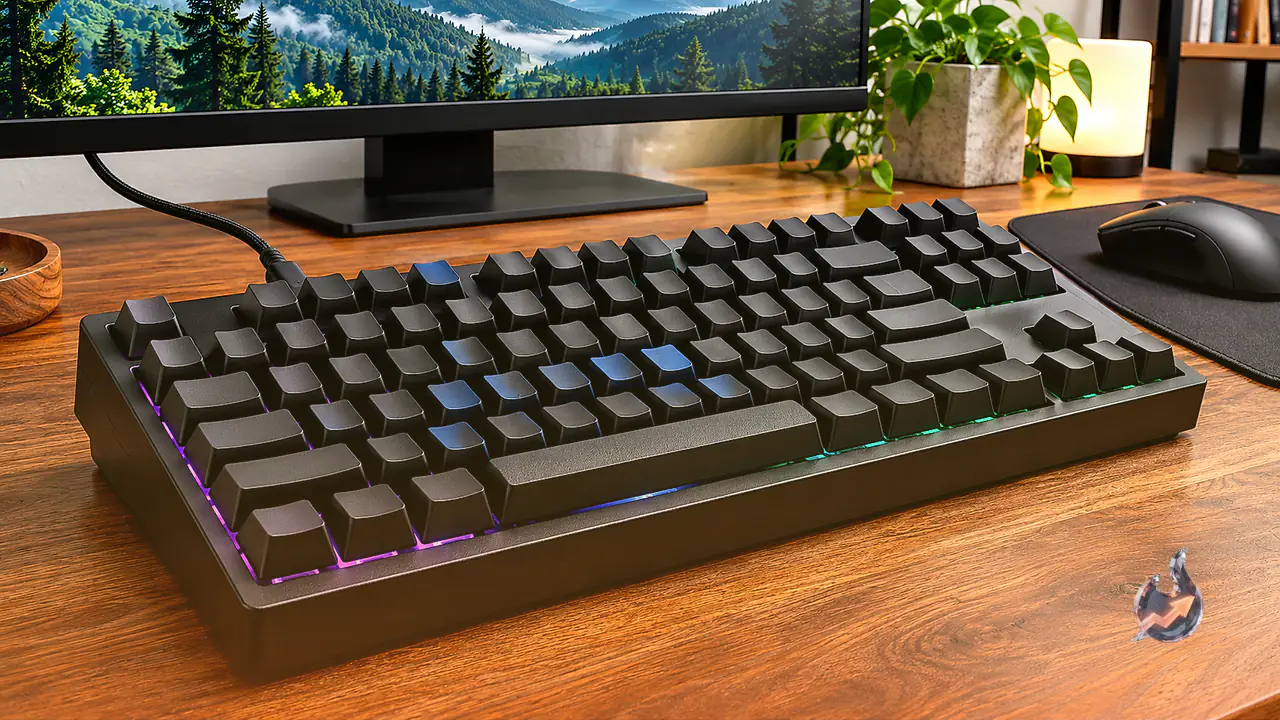
Build quality is another strength. The case is all plastic, but the overall construction is excellent. Web-based software lets users customize RGB lighting and other features. A limitation affects most models: their legends do not shine through the keycaps. The C1 Pro 8K has this issue, so its markings can be difficult to read in dim surroundings. The C3 Pro 8K is the exception, with shine-through legends that make its keys easier to see in the dark.
Typing at work
The family’s solid construction and good typing quality make it satisfactory for office tasks. Buyers can choose between linear and tactile switches. But the C1 Pro 8K assessed here produces fairly loud typing noise, which could distract people nearby in a shared workspace. Its profile is also tall. A wrist rest may help during long sessions, but none is included.
Wired connectivity imposes a separate constraint: each keyboard can connect to only one device at a time. The series was not designed with tablets or phones as its main use case, although a mobile device with a USB-C port can be connected using the included USB-C to USB-C cable. A mobile connection is possible, but it does not make the keyboard wireless.
Options for programming
Typing feel and switch choice matter during programming, and these models come with pre-lubed switches and stabilizers. Linear and tactile switches are both available. The C1 Pro 8K and C2 Pro 8K have a firm, responsive feel under the fingers, while the C3 Pro 8K’s gasket mount gives it a somewhat softer feel.
The web-based software offers extensive customization, and QMK support gives users the option to flash their own firmware. During extended coding sessions, the tall profile may make a wrist rest desirable, though one is not supplied. Backlighting also has a model-specific drawback: legends on the C1 Pro 8K and C2 Pro 8K do not shine through, which can make them difficult to read when working in dimmer light.
Limits in a living room setup
The size and connection style make the series a poor fit for an entertainment or home theater PC. These boards are bulky and tall, so using one on a lap can be awkward. Since they rely on a cable, the keyboard needs to stay fairly close to the device. There is no trackpad or dedicated media control keys either, so people may need another way to navigate or control playback.
Visibility is another consideration in a dark room. The C1 Pro 8K and C2 Pro 8K lack shine-through legends, making their markings hard to read in low light. The C3 Pro 8K differs because its legends are visible through the lighting. Buyers should also account for differences in mounting, keycaps and backlighting across the range. Not every board uses the same construction: the C1 Pro 8K assessed here has a tray mount and south-facing LEDs.
Choosing among the variants
The assessed TenKeyLess (80%) C1 Pro 8K uses a tray-mount design and south-facing LEDs. Other models can differ in mounting design, keycaps and backlighting, so the details observed on one variant do not necessarily describe every board in the family. Shared features include PBT keycaps, RGB lighting, wired connectivity and the newer 8000Hz polling support.
For gaming, the combination of very low latency, fast polling and reliable registration of simultaneous inputs is the series’ clearest advantage. Programmers also get quality typing, switch options, customization and firmware support. Its tall profile, typing noise, dependence on a cable and limited visibility on several models are the trade-offs that determine where the family is less convenient.