























Zone 2 cardio training has become a cornerstone of endurance running culture over recent years. The core philosophy of Zone 2 revolves around performing low-intensity, conversational-effort cardiovascular exercise. Consistently staying within this metabolic intensity range helps athletes build a bigger aerobic engine, achieve faster race times, and support overall health and a longer life.
However, training effectively by heart rate presents practical hurdles because target zones are easily miscalculated or misunderstood. Many recreational runners routinely drift into a ambiguous grey zone where their speed is slightly too fast to deliver true recovery benefits, yet too slow to stimulate major high-intensity adaptations. Modern fitness wearables show real-time metrics, but default settings frequently lead runners astray. Implementing specific configuration adjustments on your smartwatch can ensure your Zone 2 workouts remain precise and effective.
1. Swap Pace for Live Heart Rate Zone as Your Primary Data Field
Relying heavily on pace metrics during easy runs can be misleading due to external daily variables. Terrain elevation, high humidity, warm weather, and cumulative muscular fatigue dramatically alter physical exertion. For instance, maintaining a 9:30 per mile pace might keep an athlete firmly inside Zone 2 on a flat, cool morning, but that exact same pace could elevate heart rate into Zone 4 on an incline during warm conditions.
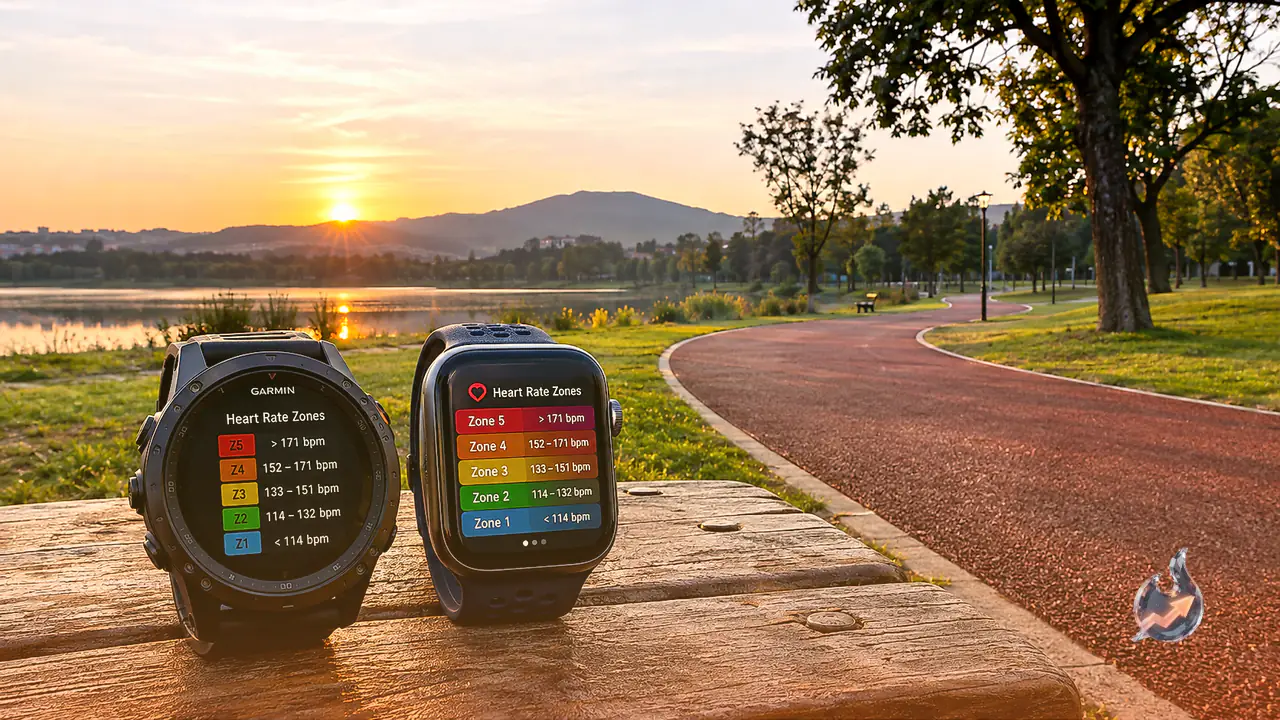
To prevent overexertion, reconfigure your device's activity layout. On Garmin wearables, navigate to Activity > Data Screens; on Apple Watch, adjust the Workout app layout settings; on platforms from Coros, Polar, or Suunto, access the corresponding screen customization menus. Position the live heart rate zone front and center, selecting a visual zone gauge or integer display over a small raw beats-per-minute (bpm) numerical value.
2. Enable Haptic and Audio Alerts for Zone Ceilings
Setting automated warnings when your heart rate exceeds target intensity thresholds provides immediate accountability. Program your smartwatch to issue a vibration pattern, an audible tone, or both whenever your heart rate crosses the upper ceiling of Zone 2.
This configuration acts like a digital coach monitoring your wrist. The moment your effort spikes and triggers the sensory alert, immediately reduce your running pace to a relaxed jog or walking recovery until your heart rate settles safely back into the target zone.
3. Program Custom Workouts with Target Heart Rate Ranges
Rather than starting an unguided open run and analyzing telemetry post-workout, pre-program structured sessions directly onto your device. Using platforms like Garmin Connect, TrainingPeaks, Apple Custom Workouts, or Coros Training Hub, you can construct custom routines such as a 10-minute Zone 1 warm-up, followed by 40 minutes targeting Zone 2, ending with a 5-minute cooldown.
While running, the smartwatch screen guides you through active intervals, displaying real-time target status indicators. Pre-programmed custom targets are particularly beneficial for
- Heart Rate Intervals: Structured sets like 4 x 4 minutes in Zone 4 with Zone 1 recovery periods, eliminating manual timing math.
- Progressive Long Runs: Workouts designed to begin steadily in Zone 2 before advancing into Zone 3.
- Hill Repeats: Training scenarios where pace data becomes unreliable due to incline, making internal effort tracking critical.
4. Recalibrate Default Smartwatch Heart Rate Zones
Standard device setups often compute heart rate zones using age-estimated formulas like 220 minus age. These population-wide averages can miscalculate individual heart rate thresholds by 10 to 20 beats per minute. If zone boundaries are inaccurate, intended Zone 2 training will fail to produce desired physiological results.
Steps to establish accurate zone boundaries
- Identify True Maximum Heart Rate: Observe sustained metrics recorded during maximum effort, or perform a structured treadmill talk test protocol. Reviewing data from recent races or hill sprints also helps establish peak heart rate figures.
- Utilize Lactate Threshold Heart Rate (LTHR): Modern sports watches frequently estimate LTHR after intense efforts. Zones anchored to lactate threshold offer superior personalization compared to basic age formulas.
- Manually Input Custom Parameters: Enter customized range boundaries in settings. Many endurance runners utilize the MAF method (180 minus age with health adjustments) to build base capacity.
- Re-Evaluate Periodically: Recalibrate zone settings every few months to match shifts in aerobic conditioning.
5. Streamline Data Screens to Remove Distractions
Excessive metrics cluttering your display, such as cadence, vertical oscillation, ground contact time, running power, and lap splits, create cognitive noise during low-intensity sessions.
Design a dedicated low-intensity data screen showing only two or three core metrics: current heart rate zone, total elapsed duration, and overall distance. Disable auto-scroll features to prevent automatic transitions to complex data pages. For watches supporting multiple activity profiles, set up a dedicated 'Easy Run' profile with minimalist displays separate from race day layouts.
Bonus Tip: Pair an External Chest Strap for Enhanced Accuracy
Wrist-based optical sensors can suffer from latency or cadence-lock artifacts during rapid movement changes. External chest straps or upper-arm optical monitors deliver superior responsiveness and accuracy. Dedicated chest monitors like the COOSPO heart rate sensor (priced around $31.99) provide reliable tracking. Even when paired with advanced sports watches like the Garmin Forerunner 970 (available around $649.99 at Amazon, down $100 from its $749.99 list price), utilizing an external chest sensor ensures optimal precision for heart rate zone training.