























The arrival of the annual monsoon brings a refreshing change in weather, but it also creates severe environmental hazards for sensitive household electronics. Most consumers naturally associate gadget damage with direct exposure to rainwater, yet indoor humidity and trapped atmospheric moisture pose an equally destructive threat to electronic components. Devices such as flat-screen televisions, Wi-Fi routers, laptops, wireless speakers, and digital cameras that remain continuously exposed to damp indoor air face a significantly heightened risk of internal circuit corrosion, port degradation, and sudden short circuits. This danger increases substantially when equipment is installed directly against exterior building walls, placed in close proximity to glass windows, or confined inside unventilated furniture units. Safeguarding your valuable home technology throughout the rainy season does not require expensive protection gear or technical expertise. Instead, adopting simple spatial adjustments and sensible daily maintenance habits can effectively protect your electronics from moisture-induced damage.
Maintain Safe Distance from Damp External Walls and Windows
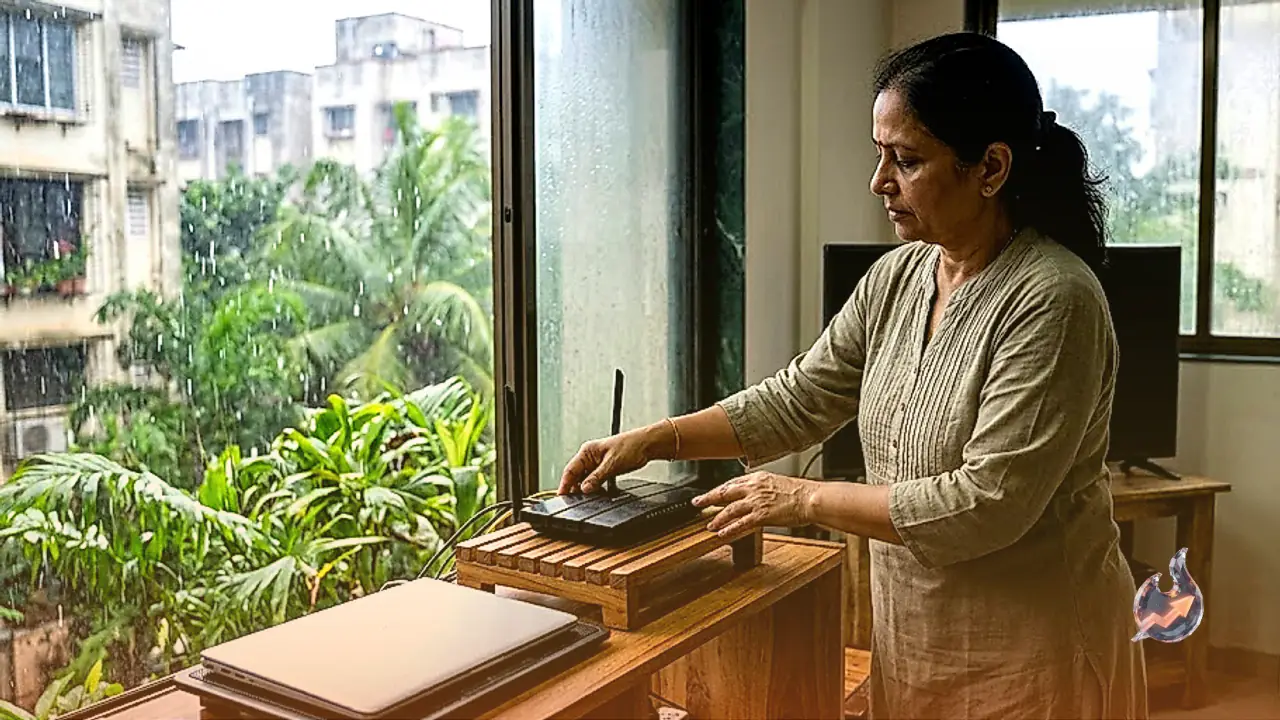
During extended periods of continuous rainfall, external building walls absorb substantial amounts of water and retain dampness long after the rain stops. Even when an interior wall surface feels completely dry to the touch, the air layer immediately surrounding it carries high relative humidity. Similarly, temperature differentials during the monsoon frequently cause condensation and moisture droplets to accumulate on glass window panes, making nearby areas unusually damp. Installing televisions, Wi-Fi routers, or audio amplifiers right against a wall or near a window frame exposes their delicate input ports, HDMI sockets, and power connections to constant moisture. To prevent hardware degradation, always maintain a clearance of several inches between electronic devices and surrounding walls. Placing gadgets on dry wooden tables, dedicated media stands, or open shelves ensures consistent airflow and protects them from hidden dampness.
Do Not Seal Wi-Fi Routers Inside Enclosed Furniture Cabinets
It has become a widespread home decorating trend to hide Wi-Fi routers inside television cabinets, wooden sideboards, or closed entertainment centers to conceal messy power cords and maintain a streamlined room aesthetic. While this practice improves visual neatness, it creates detrimental operational conditions for networking equipment. As Wi-Fi routers operate continuously to transmit radio signals, their internal processors and power circuits generate operational heat. When a router is locked inside an enclosed cabinet with inadequate ventilation, this heat cannot escape and accumulates rapidly around the device. Combined with heavy monsoon humidity, trapped thermal energy places severe stress on internal microchips. This frequently leads to degraded signal range, dropped internet connections, thermal throttling, or premature hardware failure. Always position your router in an open, elevated, and well-ventilated space where heat can freely dissipate into the room.
Pay Immediate Attention to Overheating and Signal Interruptions
Electronic appliances rarely fail without presenting early warning signs of internal stress. If your Wi-Fi router, cable set-top box, or external power supply feels excessively hot when touched, restarts unexpectedly, or experiences frequent connectivity drops, these symptoms should never be ignored. Such behavior clearly indicates that the equipment is suffering from severe thermal buildup or internal moisture accumulation. As soon as these indicators appear, inspect the device's immediate surroundings and ventilation pathways. If necessary, immediately relocate the gadget to a cooler, dryer, and better-ventilated spot to allow it to recover to normal operating temperatures. Addressing these minor operational glitches promptly prevents permanent component burnout and spares you from costly equipment replacements.
Utilize Silica Gel Packets for Infrequently Used Electronics
Almost every household maintains a collection of electronic equipment that is not used on a daily basis, such as DSLR cameras, auxiliary headphones, external hard drives, handheld gaming consoles, and spare charging cables. Leaving these items stored inside closed wardrobes, desk drawers, or plastic storage containers during the monsoon creates an environment highly susceptible to moisture buildup and mold. Storing these unused devices inside sealed containers accompanied by silica gel packets offers a remarkably effective defense against dampness. The porous granules inside silica gel packets actively absorb excess ambient humidity, keeping the air inside the storage container dry. However, users must handle silica gel with basic safety in mind: keep the packets completely sealed, never open their contents, and store them safely away from children and pets.
Never Touch Electrical Switches or Chargers with Wet Hands
Personal safety precautions are just as vital as protecting the hardware itself during the monsoon. After returning indoors from heavy rain or after handling water, never touch mobile phone chargers, extension sockets, main television switches, or wall outlets with wet hands. Water significantly reduces skin resistance and increases electrical conductivity, creating an immediate danger of dangerous electric shocks. Always dry your hands thoroughly with a clean cloth or towel before operating any electrical equipment or plugging in cables. Furthermore, if water droplets or moisture accidentally enter a smartphone's charging port or a device connector, avoid the temptation to plug it into a power source immediately. Place the device in a dry, well-ventilated indoor location and allow it to dry naturally over several hours before attempting to power it on.
Regularly Inspect Power Cords, Extensions, and Wall Outlets
Ensuring gadget safety also requires paying close attention to the power delivery infrastructure, including extension cords, adapters, and wall sockets. Electrical cables running across bare floors can easily come into contact with water spills or ground moisture during routine house cleaning or rainwater seepage. Mount power strips and extension boards at an elevated position off the floor, well away from any potential water exposure. Additionally, if you notice a burning smell, visible electrical sparks, or unusual heat emanating from any plug, cable, or power outlet, disconnect the power supply immediately and cease using the socket. Avoid attempting unsafe DIY repairs on home electrical wiring; instead, engage a qualified electrician to inspect and repair the damaged connections safely.
Summary: Simple Habits Keep Expensive Electronics Safe
Safeguarding home electronics during the monsoon comes down to maintaining dry, open, and well-ventilated environments for all your technology. Keep televisions and Wi-Fi routers away from damp exterior walls and windows, avoid suffocating active devices inside enclosed cabinets, and protect stored gadgets using silica gel packets. Do not ignore early indicators of trouble, such as excessive heat buildup, unusual operational noises, unexpected shutdowns, or intermittent signal loss. Taking these simple, proactive precautions will ensure your valuable electronic equipment operates smoothly, safely, and reliably throughout the rainy season.








